 Triple Tack
The rule of three, and why a short to-do list gets more done
Ever ticked off ten things and still not touched the one that mattered? A long list feels productive. A short one is. Here’s where the rule of three comes from, how to make it stick, and the apps (and one bit of paper) that help you keep it.
Why does the list never end?
I’ve always kept a few sticky notes on my desk, different colours, with the day’s to-dos on them. I tick things off as I get through them, and there’s a real sense of achievement in it, because the progress is right there in front of me all day.
Most to-do apps work the other way. They make it easy to add one more thing, and then another, until the list is a record of everything you haven’t done. You clear the quick jobs because they’re quick, and the one that matters gets put on the back burner. Again. The reality is, that’s not a productivity problem. It’s a choosing problem.
Where does the rule of three come from?
Nobody owns it, and plenty of people have arrived at it on their own. Here are a few worth knowing.
- J.D. Meier made it the heart of his Agile Results system in Getting Results the Agile Way (2010). Write down three results you want for today, and three for the week.
- Leo Babauta of Zen Habits suggests three Most Important Tasks a day, with at least one tied to a bigger goal, done first thing.
- Chris Bailey, author of The Productivity Project, sets three priorities for each day, each week and each year.
- And the grandparent of them all, the Ivy Lee method, which, as the story goes, dates back to 1918. Six tasks, ranked, done in order. Same idea, twice the list.
So why does three work?
It makes you choose. With room for only three, you can’t hide in the easy jobs. You have to ask which things will really move today forward, and put those down.
It’s a day you can finish. Three is enough to make a day count and few enough to get done. A finished short list feels far better than a long one with four ticks on it.
You get better at it. Do it every day and you get sharper about what matters, and more honest about how much a day can hold. That’s a skill no app can do for you.
The rest still has a home. Choosing three doesn’t mean forgetting the others. They just wait somewhere else until their day comes.
How do you make it stick?
- Choose before the day chooses for you. The night before, or first thing, before the inbox gets a vote.
- Put the one that matters most first. If it’s the only thing you finish, the day still counted.
- Give everything else a parking spot. A board, a list, a page. Anywhere that isn’t today.
- Done beats perfect. A finished line is worth more than a polished one you never get to.
- Don’t top it up with easy ones. Finished all three by lunch? Brilliant. That was a good day. Go for a walk. Grab a coffee. Start a fresh three if you really want to, but don’t swap the hard one for two quick ones.
- Look back at the week. Seeing what you actually got done is the best reason to keep going.
Which apps help you keep three?
You can keep a three-item list anywhere. These make it easier, in order of how well they hold you to it.
Number 1. Triple Tack
Built for exactly this
- Price
- $6.99 / €6.99 / £5.99 once, for iPhone and iPhone Duo.
- How it keeps three
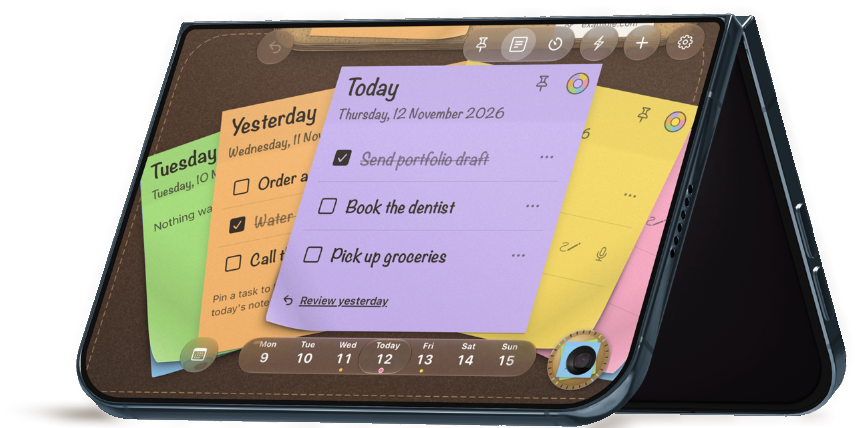
- One sticky a day with three lines. Everything else goes on a pinboard above it.
I built Triple Tack because I wanted my desk’s sticky notes on my phone. A crossed-off line still counts as one of the three, so you can’t clear space by knocking off the quick ones. Unfinished stickies go up on the board at the end of the day, so nothing’s lost. Today’s sticky sits on your Lock Screen and in the Dynamic Island, so it’s there every time you look, and a calendar keeps every week you’ve done.
Good for making the rule of three a daily habit.
Think twice if you need it on more than your iPhone. It doesn’t sync between devices yet.
Number 2. A paper sticky note
The original. The OG. The GOAT.
- Price
- Next to nothing.
- How it keeps three
- It’s small, and it’s sticky. That’s the whole trick.
Honestly, still great. Always in sight, deeply satisfying to cross off, and no battery to run down. The catch is that it stays where you stuck it. It isn’t always with you, the way your phone is. It doesn’t remember last Tuesday, and it’s lost its stick by Thursday.
Good for a desk you sit at all day.
Think twice if your day doesn’t stay at one desk, or you want to see how far you’ve come.
Number 3. Things 3
Best if your three come from bigger projects
- Price
- $9.99 / €9.99 / £9.99 once for iPhone. iPad and Mac sold separately.
- How it keeps three
- Move your three into the Today list. Things doesn’t stop at three, so the limit is up to you.
If your day’s three are pieces of larger projects, Things is lovely for keeping the whole picture in one place, across iPhone, iPad and Mac.
Good for people with projects and the discipline to stop at three.
Think twice if a Today list tends to grow on you.
Number 4. Microsoft To Do
Best free way to start fresh each day
- Price
- Free, with a Microsoft account.
- How it keeps three
- My Day starts empty every night. Unfinished tasks go back to their lists and turn up as suggestions the next day.
A clean slate every morning is a good habit, and it’s on Windows, Android and the web too. Nothing caps it at three, but starting from empty helps.
Good for people already using Outlook and Microsoft 365.
Think twice if you’re on iPhone Duo. It had no Duo update in its release notes when I checked.
Number 5. Apple Reminders
Best free option on iPhone
- Price
- Free, built in.
- How it keeps three
- Flag your three, or make a list called Today and keep it short.
Already on your iPhone, made for iPhone Duo, with an extra-large widget to keep your three on the Home Screen.
Good for trying the rule of three before you spend anything.
Think twice if you need a nudge to stop at three. It’s up to you.
So where do you start?
Three things. The one that matters most first. Everything else somewhere it can wait. You can do it with a pen and a sticky note, and you should try it that way at least once. If you want it on your iPhone, in sight all day and adding up week by week, that’s what I made Triple Tack for.
Comparing apps for the bigger screen? See the best to-do apps for iPhone Duo.
If this was useful, pass it on to someone whose list could do with a trim.
Sources
- J.D. Meier, Getting Results the Agile Way, 1 March 2010.
- Leo Babauta, Purpose Your Day: Most Important Task, Zen Habits.
- Chris Bailey, The Rule of 3, 15 April 2025.
- James Clear, The Ivy Lee Method.
- Cultured Code, Things pricing. Microsoft, My Day and suggestions. Apple Reminders on the App Store. Checked 17 November 2026.