 Triple Tack
The best notes apps for iPhone Duo
Thinking of using your iPhone Duo as a notebook? Good call. Unfold it and you’ve got one in your hand. Here are the notes apps that treat it like one, whether you write, type, sketch or just need to get a thought down fast.
What should a notes app do on the fold?
You’ll want more than a stretched phone app. A notes app earns its place on iPhone Duo when the inside screen shows more than one thing at once, like your folders beside the note you’re writing. Closed, it should still be quick for jotting something down. And if you write by hand, it should keep your page out of the crease. Apps that haven’t been updated for iPhone Duo still open, but on the inside screen they sit in the middle with black bars either side.
At a glance
| App | Best for | Price (checked 17 Nov 2026) |
|---|---|---|
| Apple Notes | Everyday notes, free | Free, built in |
| Goodnotes | Handwriting and PDFs | Free for 3 files, then from $11.99 a year |
| Notability | Lectures and meetings | Free for 5 notes, then a yearly plan |
| Bear | Writers who like Markdown | Free, Pro $29.99 a year for sync |
| Triple Tack | Notes that are really to-dos | $6.99 / €6.99 / £5.99 once |
| Craft | Good-looking documents | Free to start, Plus $9.99 a month |
| Drafts | Getting text down fast | Free, Pro $19.99 a year |
| Notion | Teams and shared wikis | Free for one person, paid plans per member |
US prices from each developer’s pricing page or App Store page. Prices in euro and sterling vary, and they all change, so check before you buy.
Number 1. Apple Notes
Best for most people
- Price
- Free, built in.
- On iPhone Duo
- Apple uses Notes as its own example. Your folders and your note sit side by side, and the two panes even out when you fold it like a book. There’s an extra-large Home Screen widget too.
It’s already on your iPhone, it syncs through iCloud, and it does more than most people use. It has checklists, shared notes and folders with mentions, and an Apple Watch app for glancing at a note or ticking off a checklist.
Good for nearly everyone, as a start.
Think twice if you share notes with people on Android or Windows.
Number 2. Goodnotes
Best for handwriting
- Price
- Free for up to 3 files. Essential is $11.99 a year, Pro $35.99 a year, or there’s a one-time edition for Apple devices ($35.99 on the US App Store).
- On iPhone Duo
- A two-level toolbar, a reading mode, and layouts for folded, half-folded and open, according to its release notes.
Goodnotes turns the open Duo into a paper notebook with an undo button. Write, mark up PDFs, and share a link to work on a notebook together. It’s on Android, Windows and the web too, though syncing between Apple and other devices needs Pro.
Good for handwritten notes, study and marking up documents.
Think twice if you mostly type. Three free files go quickly.
Number 3. Notability
Best for lectures and meetings
- Price
- Free for 5 notes, then a yearly plan. It was running a sale when I checked, so see notability.com for today’s prices.
- On iPhone Duo
- Its release notes mention updated toolbars for Duo, and iThinkDiff reports a two-pane library on the inside screen, with notes kept clear of the fold.
Notability mixes handwriting, typing, audio and PDFs in one note, which is why it’s a long-time favourite for classes and meetings. It has widgets, Siri and Shortcuts actions, and works on iPhone, iPad, Mac and the web.
Good for people who want to record and write at the same time.
Think twice if you’ll need more than five notes before paying.
Number 4. Bear
Best for writers
- Price
- Free for notes on one device. Pro is $2.99 a month or $29.99 a year, and adds iCloud sync.
- On iPhone Duo
- “Bear is now ready for iPhone Duo!”, say its release notes, along with a new panel design.
Bear is a calm, beautifully made place to write, with Markdown, tags and very little in the way. It has a Home Screen widget, Siri and Shortcuts, and you can dictate a note from your Watch.
Good for writers, journallers and tidy minds.
Think twice if you need it on Windows or Android. It’s Apple only, and sync needs Pro.
Number 5. Triple Tack
Best for notes that are really to-dos
- Price
- $6.99 / €6.99 / £5.99 once. No ads.
- On iPhone Duo
- A layout for every way you hold it. Closed, open wide or tall, folded like a book, flat on a table, or stood up like a tent.
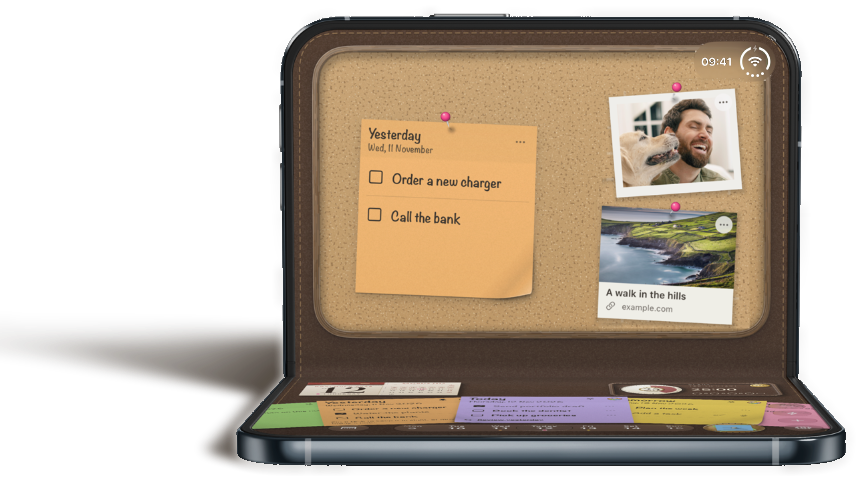
This one’s mine, so read it with that in mind. Plenty of us use a notes app as a to-do list, one long note that never quite gets shorter. Triple Tack is made for exactly that. One sticky a day with room for three things, and everything else pinned to a board where you can still see it. Unfold your Duo and the board, your days and a focus timer are all in view at once, and today’s sticky stays on your Lock Screen.
Good for turning a never-ending note into a day you can actually finish.
Think twice if you want long notes, handwriting or documents. It’s a to-do app at heart, it’s iPhone only, and it doesn’t sync between devices yet.
Number 6. Craft
Best for good-looking documents
- Price
- Free to start (up to 1,500 blocks). Plus is $9.99 a month on the US App Store.
- On iPhone Duo
- Apple names Craft among the apps made for iPhone Duo, with more room across notes, tasks and documents when it’s open. Craft’s own release notes didn’t mention it when I checked.
Craft makes documents that look finished without much effort, and it has tasks with Inbox and Today views built in. There are Home Screen and Lock Screen widgets, and several people can edit together.
Good for people who want their notes to look as good as they read.
Think twice if you just want quick plain notes.
Number 7. Drafts
Best for getting it down fast
- Price
- Free. Pro is $1.99 a month or $19.99 a year in the US.
- On iPhone Duo
- “Ready for iPhone Duo”, say its release notes.
Drafts opens on a blank page, so the thought gets written before it goes. Then you decide where it belongs and send it on, to another app, a message or an email.
Good for capturing first and sorting later.
Think twice if you want one place to keep everything for good.
Number 8. Notion
Best for teams
- Price
- Free for one person. Paid plans are priced per member.
- On iPhone Duo
- “iPhone Duo support”, say its release notes, without more detail.
Notion is docs, wikis and databases in one shared workspace, on every platform. On a phone it’s best for reading and quick edits to things your team already keeps there.
Good for teams who already work in Notion.
Think twice if it’s just you and a few lists. That’s a lot of app for a shopping list.
What about Obsidian and Evernote?
Neither had an iPhone Duo update in its release notes when I checked on 17 November 2026. Both still run on iPhone Duo. They just aren’t made for it yet. If your notes already live in one of them, it’s probably worth sitting tight.
So which one’s right for you?
Start with Apple Notes. It’s free, it’s already there, and for most people it’s plenty. If you write by hand, go for Goodnotes. Record lectures or meetings? Notability. If you write for the love of it, Bear. And if your notes are mostly things to do, give Triple Tack a go. Take your pick, then take some notes.
For to-do apps proper, see the best to-do apps for iPhone Duo.
If this was useful, pass it on to someone who’s just unfolded their first iPhone Duo.
Sources
- Apple, Designing for iPhone Duo, and Developers bring incredible new app experiences to iPhone Duo, 22 October 2026.
- MacStories, iOS and iPadOS 27 review. Apple Notes on the App Store.
- Goodnotes, pricing and App Store release notes.
- Notability, pricing and App Store release notes. iThinkDiff, Notability’s two-pane library on iPhone Duo, 5 November 2026.
- Bear, bear.app and App Store release notes.
- Craft, pricing and App Store page.
- Drafts, Drafts Pro and App Store release notes.
- Notion, App Store release notes and pricing.
- Obsidian and Evernote, App Store release notes, checked 17 November 2026.