 Triple Tack
The best to-do apps for iPhone Duo
Got your hands on an iPhone Duo? Then your day just got a lot more room. The trick is filling it with the right things. Here are the to-do apps that are made for the fold, and the big names still catching up.
What does “made for iPhone Duo” actually mean?
Apps built for iOS 27.1 or later can use both screens properly and get a Made for iPhone Duo label on the App Store. Apps that haven’t been updated still open, but on the big inside screen they sit in the middle with black bars either side, as 9to5Mac explains. It works. It just feels like watching an old film on a new telly.
A good Duo app does more than stretch. Closed, it fits the smaller outside screen. Open, it uses the extra room for something useful, like your lists beside the list you’re in. Folded like a book or propped on a table, it keeps the controls where your thumbs are. The devil really is in the details.
How did I pick?
Every app here is made for iPhone Duo, going by its developer’s release notes or by Apple. After that, I asked three questions. Does it help you get things done, not just collect them? Is the price fair for what you get? And who is it really for? I left star ratings out of it. Triple Tack is too new to have any, and that wouldn’t be a fair fight either way.
At a glance
| App | Best for | Price (checked 17 Nov 2026) |
|---|---|---|
| Things 3 | Projects across iPhone, iPad and Mac | $9.99 / €9.99 / £9.99 once for iPhone |
| Triple Tack | A focused day, always in sight | $6.99 / €6.99 / £5.99 once |
| Structured | Planning the day as a timeline | Free, with a Pro upgrade |
| TickTick | Everything in one app, on every device | Free, Premium $49.99 / €49.99 / £49.99 a year |
| OmniFocus 4 | Big projects, the Getting Things Done way | Free trial, then from $74.99 once or $99.99 a year |
| Apple Reminders | Free, and shared lists | Free, built in |
| Due | Reminders that won’t let go | $7.99 / €8.99 / £7.99 once |
Prices are from each app’s App Store page in the US, Ireland and the UK, or its developer’s own pricing page. They change, so check before you buy.
Number 1. Things 3
Best all-rounder
- Price
- $9.99 / €9.99 / £9.99 once for iPhone, Apple Watch app included. iPad and Mac are sold separately.
- On iPhone Duo
- Fits closed, open and folded like a book. Open, you get a sidebar of your lists, a first for Things on iPhone, and two windows side by side that you can drag between.
Things has been the benchmark for well-made to-do apps on Apple devices for a long time, and the Duo update keeps it there. Areas, projects and headings give big plans somewhere to live, the Today list keeps the day in view, and it still feels light in the hand. Home Screen and Lock Screen widgets, Siri, Shortcuts and the Watch are all covered, and syncing through Things Cloud is free.
Good for people juggling projects across iPhone, iPad and Mac.
Think twice if you share lists. Cultured Code says Things doesn’t do real-time sharing of to-dos or lists, and it’s for Apple devices only.
Number 2. Triple Tack
Best for a focused day
- Price
- $6.99 / €6.99 / £5.99 once. Every desk, board and finish included. No ads.
- On iPhone Duo
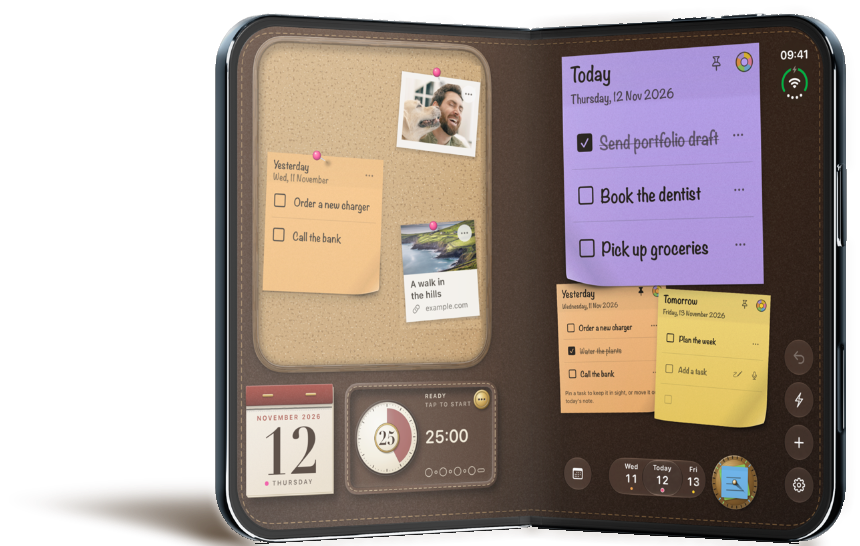
- A layout for every way you hold it. Closed, open wide or tall, folded like a book, flat on a table, or stood up like a tent.
This one’s mine, so read it with that in mind. Triple Tack gives you one square sticky a day, with room for three to-dos. Anything else goes up on a pinboard, where it stays in sight until its day comes. Now, you might be thinking three is a bit stingy. It is, and that’s rather the point. Choosing three makes you pick the things that will really move the day forward, and over time you get better at judging what a day can actually hold.
On iPhone Duo it opens right up. Unfold it and the board, your days and a focus timer are all in view at once. Stand it up like a tent and today’s sticky is there on your desk all day. Away from the app, today’s sticky sits on your Lock Screen and in the Dynamic Island, and there are Home Screen widgets for the sticky, the board or the whole desk. Say “Triple Tack, new task” and Siri asks what to write.
Good for anyone whose list has grown longer than their day.
Think twice if you need projects, shared lists or the same list on your Mac. It’s iPhone only, and it doesn’t sync between devices yet.
Number 3. Structured
Best for planning the day by the hour
- Price
- Free, with a Pro upgrade. The App Store lists several Pro prices, so check the current one in the app.
- On iPhone Duo
- Its release notes say the layouts adapt as you fold and unfold, with a focus timer designed for the book and tabletop positions.
Structured puts your tasks and to-dos on a single visual timeline, so you see your day as a shape rather than a list. It has Live Activities, interactive widgets and an Apple Watch app.
Good for people who think in time blocks.
Think twice if you’d rather not give every task a time.
Number 4. TickTick
Best all-in-one
- Price
- Free. Premium is $49.99 / €49.99 / £49.99 a year.
- On iPhone Duo
- “Optimized for iPhone Duo”, say its release notes, without more detail.
TickTick packs tasks, a calendar, a habit tracker, a Pomodoro timer and an Eisenhower Matrix into one app, with Live Activities and extra-large widgets on iPhone. It’s on Android, Windows, Mac and the web too, and lists can be shared.
Good for people who want everything in one place, on every device they own.
Think twice if you want a calm, simple list. And the full calendar views need Premium.
Number 5. OmniFocus 4
Best for big projects
- Price
- Two weeks free, then $74.99 once (Standard) or $99.99 a year with web access. One licence covers Mac, iPhone, iPad, Apple Watch and Vision Pro.
- On iPhone Duo
- Fits its controls on the smaller outside screen, spreads out on the inside one, and works in Split View beside another app or a second OmniFocus window.
OmniFocus is built for the Getting Things Done crowd. Projects, tags, custom views and a regular review keep a lot of moving parts in order, and its sync is end-to-end encrypted.
Good for people running many projects at once who like a system.
Think twice if you just want a quick list. It asks for some setting up before it pays you back.
Number 6. Apple Reminders
Best free pick, and best for sharing
- Price
- Free, built in.
- On iPhone Duo
- Apple’s own. Your lists and the list you’re in sit side by side, and even out to a 50/50 split when you fold it like a book.
Reminders is better than its reputation. You can share lists and assign reminders to the people you share with, grocery lists sort themselves into sections, and in iOS 27 you can type a date, time or place in plain words and it fills them in. There’s an extra-large widget, and it works with Siri and the Watch.
Good for households, shared shopping lists and anyone who wants it all for free.
Think twice if someone you share with uses Android. It’s Apple only.
Number 7. Due
Best for reminders that won’t let go
- Price
- $7.99 / €8.99 / £7.99 once, with an optional yearly upgrade pass. The Mac app is sold separately.
- On iPhone Duo
- “Made for iPhone Duo”, its release notes say, and at home “whether folded or open”.
Due does one thing and does it doggedly. Miss a reminder and Auto Snooze nudges you again every 1 to 60 minutes until you deal with it. It has Live Activities, Home Screen and Lock Screen widgets, Siri and a Watch app.
Good for medication, bins and anything with a time on it.
Think twice if you want to plan your day. Due is about remembering, not choosing.
What about Todoist, Microsoft To Do and Any.do?
Some of the best-known to-do apps had no iPhone Duo update in their release notes when I checked on 17 November 2026. They still run on iPhone Duo. They just aren’t made for it yet. If you already live in one of them, it may well be worth waiting.
- Todoist. The cross-platform favourite, strong on shared projects. Free to start, Pro is $59.99 / €59.99 / £59.99 a year on the App Store.
- Microsoft To Do. Free with a Microsoft account. Its My Day list starts fresh every night, which is a nice habit to build.
- Any.do. Free to start, popular with families for shared lists. Premium starts at $4.99 a month, billed yearly.
So which one’s right for you?
Ultimately, it comes down to how you like to work. If you want one app for everything across your Apple devices, get Things 3. If you want the few things that matter today done, and in sight all day, try Triple Tack. If it has to be free or shared with the family, Apple Reminders is better than you’d think.
And if your list keeps getting longer, nine times out of ten it isn’t the app. I wrote about that in the rule of three.
If this was useful, pass it on to someone whose list is longer than their day.
Sources
- Apple, Developers bring incredible new app experiences to iPhone Duo, 22 October 2026.
- 9to5Mac, How iPhone Duo treats apps not optimized for the foldable display, 9 September 2026. MacRumors, Made for iPhone Duo App Store label, 22 October 2026.
- MacRumors, Things Updated for iPhone Duo With Adaptive Layout, 21 October 2026. Cultured Code, pricing and sharing.
- Structured, App Store page and release notes.
- TickTick, Premium and App Store release notes.
- The Omni Group, OmniFocus pricing and App Store release notes.
- Apple, Strike a pose with adaptive layouts on iPhone Duo. MacRumors, iOS 27 Calendar and Reminders.
- Due, dueapp.com and App Store release notes.
- Todoist pricing, Microsoft To Do, My Day, Any.do pricing, and each app’s App Store release notes, checked 17 November 2026.